# Run Zircuit

{% hint style="info" icon="triangle-exclamation" %}

## Note that [SLS](https://docs.zircuit.com/info/architecture/sls) is not enabled while we [focus](https://www.zircuit.com/blog/a-new-chapter-for-zircuit-from-l2-to-defi) on Zircuit Finance. Zircuit Finance does not rely on the Zircuit chain.

{% endhint %}

## Overview

Run your own Public Zircuit Node or Partner Zircuit Node on Mainnet or Garfield-Testnet. This guide covers setup, configuration, and operations for both public and partner node operators.

### Prerequisites

#### System Requirements

* **OS**: Linux or macOS
* **Python**: 3.11 or higher
* **Storage**:
  * **Type**: Solid State
  * **Garfield-Testnet**: 200-300 GB initially (grows over time as network progresses)
  * **Mainnet**: 750-1000 GB initially (grows over time as network progresses)
* **CPU**: 4 cores recommended
* **RAM**: 16 GB recommended
* **Software**:
  * Docker + Docker Compose (required),
  * lz4 (for snapshot decompression, required),
  * aria2c (for accelerating snapshot downloads, optional but **strongly recommended**)
  * sha256 utils (for verifying snapshot integrity, required)

For testing on a desktop computer, both Docker Desktop (with Compose extension) and Podman Desktop (with Compose extension) should work.

## Quick Start

### Get the Script

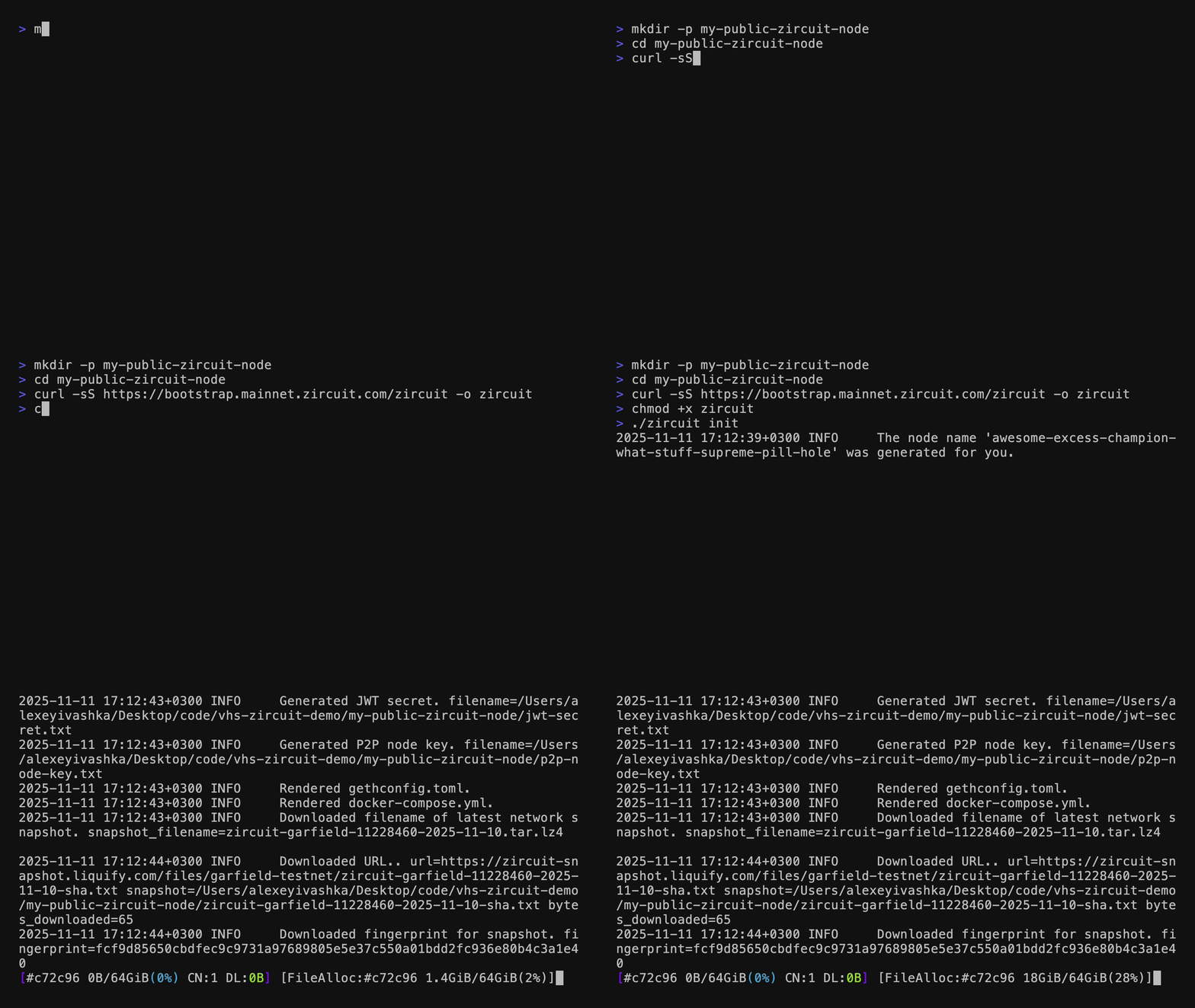
Make a new directory and download the node controller script to it:

```bash
mkdir -p my-public-zircuit-node
cd my-public-zircuit-node
curl -sS https://bootstrap.mainnet.zircuit.com/zircuit -o zircuit
chmod +x zircuit
```

{% hint style="info" %}
The script doesn't support to be run as the `root` user. Use a regular user instead.
{% endhint %}

### Initialize as a Public Node

#### **Testnet (default)**

```bash
./zircuit init
```

#### **Mainnet**

```bash
./zircuit init --network mainnet
```

The above commands will:

* Synchronize the latest chaindata [snapshot](#snapshots).
* Generate node identity files (JWT secret, P2P key).
* Create configuration files for use with Docker Compose.
* Request a unique node name from our bootstrap service.
* Load network-specific configuration from embedded defaults and remote bootstrap server.

After initialization, your directory will contain:

```
test-node/
├── docker-compose.yml          # Docker services configuration
├── env-l2geth                  # Environment variables for l2geth
├── env-op_node                 # Environment variables for op-node
├── env-partner                 # Environment variables for partner mode, only if partner mode is enabled
├── env-zircuit                 # Environment variables for zircuit
├── gethconfig.toml             # Geth configuration
├── jwt-secret.txt              # Authentication secret
├── l2-replica-data/            # l2geth data directory
├── op-replica-log/             # op-node data directory
├── p2p-node-key.txt            # P2P identity key
├── zircuit-garfield-...tar.lz4 # Downloaded snapshot (compressed)
├── zircuit-garfield-...tar.txt # Fingerprint (sha256) for downloaded snapshot
└── zircuit                     # Node controller script
```

<figure><img src="https://3252263143-files.gitbook.io/~/files/v0/b/gitbook-x-prod.appspot.com/o/spaces%2Fp2pPzGBdConDaqw5tnHs%2Fuploads%2Fgit-blob-45ab31002142b11a67959e11590b8d99c0ac5847%2Fzircuit-demo.gif?alt=media" alt=""><figcaption></figcaption></figure>

### Start Node

```bash
./zircuit up
```

This command will:

* Check that the Docker daemon is running.
* Start the Docker containers (l2geth and op-node).
* Begin syncing with the Zircuit network.
* Connect to P2P peers.
* Start serving RPC endpoints.

#### Monitor Logs

```bash
./zircuit logs
```

This shows the last 1000 lines and then follows (live-tails) new logs. Press `Ctrl+C` to exit.

### Available Commands

| Command             | Description                                      |
| ------------------- | ------------------------------------------------ |
| `./zircuit init`    | Initialize the node from scratch                 |
| `./zircuit sync`    | Sync a new chaindata snapshot                    |
| `./zircuit up`      | Start the node                                   |
| `./zircuit down`    | Stop the node                                    |
| `./zircuit restart` | Restart the node                                 |
| `./zircuit logs`    | View the node logs (last 1000 lines + live tail) |
| `./zircuit update`  | Update the node version and node configuration   |

### Configuration Options

#### General Options

```bash
./zircuit --help
```

Key options:

* `-d|--debug`: Raises the log level from INFO to DEBUG.

#### Initialization Options

```bash
./zircuit init --help
```

Key options:

* `-env|-n KEY=VALUE`: Sets extra environment variables for both l2geth and op-node.
* `--force`: Forces complete (re-)initialization of Zircuit Node.
* `--network|-n garfield-testnet|mainnet`: Selects the Zircuit network to operate in. (default: `garfield-testnet`)
* `--mode|-m public|partner` : Select the mode to operate in. (default: `public`)
* `--skip-snapshot-sync`: Skips downloading the latest snapshot.
* `--snapshot-name`: Use an already downloaded snapshot.
* `--version <VERSION>`: Overrides the version of Zircuit Node to run.
* `--version-stream release|pre-release`: Sets the version stream to follow. (default: `release`)

**Examples:**

```bash
# Default initialization
./zircuit init

# Initialize without downloading snapshot
./zircuit init --skip-snapshot-sync

# Initialize with existing snapshot
./zircuit init --skip-snapshot-sync --snapshot-name snapshot-garfield.tar.lz4

# Initialize mainnet node
./zircuit init --network mainnet
```

### Public vs. Partner Nodes

#### **Public Nodes (Default)**

* Ready to use without additional configuration.
* Uses public L1 RPC endpoints (rate-limited).
* Defaults to Garfield-Testnet (use `--network mainnet` for Mainnet).
* Configuration loaded from embedded defaults and bootstrap server

#### **Partner Nodes (Advanced)**

```bash
./zircuit init --mode partner
```

Requires configuration of:

* Node name for ETH Stats (if integration is enabled)
* ETH Stats shared secret (if integration is enabled)
* Custom L1 RPC endpoint
* Custom L1 Beacon URL
* Zircuit L2 RPC endpoint

For the L1 endpoints, you may set the endpoints provided by PublicNode but the same performance caveat applies.

## Important Notes

### Performance Warnings

The script will display warnings when using public infrastructure:

* "Your Zircuit Node is using a rate-limited L1 RPC endpoint"
* "Your Zircuit Node is using a rate-limited L1 Beacon endpoint"

For optimal performance, consider configuring dedicated L1 endpoints.

### Updates

The node automatically checks for updates every 30 minutes (configurable). When updates are available:

1. Check logs for update notifications
2. Run `./zircuit update`
3. Run `./zircuit restart` to apply changes

### Snapshots

Snapshots are provided by Liquify and automatically managed:

* Latest snapshots are automatically downloaded during initialization
* SHA256 fingerprint verification ensures integrity
* Snapshots use lz4 compression for faster downloads
* Download methods:
  * **aria2c**: Used if detected on system (faster, parallel downloads)
  * **Built-in Python**: Fallback method if aria2c not available (fallback, more compatible)
* Optionally skip download with `--skip-snapshot-sync`
* Optionally use existing snapshot with `--snapshot-name`

### Configuration Cascade

The node uses a configuration cascade system:

1. **Embedded defaults**: Network-specific public bootstrap configuration built into the script.
2. **Remote configuration**: Network-specific configuration fetched from the bootstrap server.
3. **Local overrides**: Custom settings via command-line options or environment variables.

This ensures nodes always have working defaults while allowing customization and remote updates.

## Troubleshooting

### Common Issues

* **Docker not running**: Ensure Docker daemon is started.
* **Insufficient disk space**: Ensure sufficient free space (see [System Requirements](https://app.gitbook.com/o/FAE3Bv5wcSjxEUOFI86x/s/p2pPzGBdConDaqw5tnHs/~/changes/379/build/run-a-zircuit-node#system-requirements) above).
* **Missing lz4**: Install lz4 for snapshot decompression.
* **Network connectivity**: Check firewall settings for P2P ports.
* **Interrupted snapshot download**: The built-in Python download method does NOT support resuming interrupted downloads. If your download fails, you must restart from the beginning. To avoid this:
  * Install `aria2c` for more reliable downloads with support for parallel downloads and resume.
  * Ensure stable network connection before starting large downloads (especially Mainnet's \~200 GB snapshot)
  * Consider using `--skip-snapshot-sync` and downloading the snapshot manually (see below).
* **429 Too Many Requests**: If you're seeing this message in the op-node logs, you need to get a PublicNode token. Sign up at <https://www.allnodes.com/publicnode>, generate links for Sepolia RPC and Sepolia Beacon APIs, and re-initialize your Zircuit Node with the following two additional enviromnent variables:

  * `OP_NODE_L1_BEACON`, and
  * `OP_NODE_L1_ETH_RPC` .

  For example, if the links generated by AllNodes are:

  * `https://ethereum-sepolia-beacon-api.publicnode.com/d7d55ad98cbb19d147fa42a559ee7ebd02e2026115fb5b819dae81db3b25f544,`and
  * `https://ethereum-sepolia-rpc.publicnode.com/d7d55ad98cbb19d147fa42a559ee7ebd02e2026115fb5b819dae81db3b25f544`

  then add the following to your `init` command: `-e OP_NODE_L1_BEACON=https://ethereum-sepolia-beacon-api.publicnode.com/d7d55ad98cbb19d147fa42a559ee7ebd02e2026115fb5b819dae81db3b25f544 -e OP_NODE_L1_ETH_RPC=https://ethereum-sepolia-rpc.publicnode.com/d7d55ad98cbb19d147fa42a559ee7ebd02e2026115fb5b819dae81db3b25f544` . (Note that these aren't real tokens and **will not work**.)

### Manual Snapshot Download

If you experience issues with automatic snapshot downloads, you can download snapshots manually:

#### **Garfield-Testnet**

```bash
# Get the latest snapshot filename
SNAPSHOT=$(curl -sS https://zircuit-snapshot.liquify.com/files/garfield-testnet/latest_compressed_zircuit.txt)

# Download the snapshot
wget https://zircuit-snapshot.liquify.com/files/garfield-testnet/$SNAPSHOT
# or use aria2c for resume support:
aria2c -x 16 -s 16 https://zircuit-snapshot.liquify.com/files/garfield-testnet/$SNAPSHOT

# Download the verification file
wget https://zircuit-snapshot.liquify.com/files/garfield-testnet/$SNAPSHOT.sha256

# Initialize with the downloaded snapshot
./zircuit init --skip-snapshot-sync --snapshot-name $SNAPSHOT
```

#### **Mainnet**

```bash
# Get the latest snapshot filename
SNAPSHOT=$(curl -sS https://zircuit-snapshot.liquify.com/files/mainnet/latest_compressed_zircuit.txt)

# Download the snapshot
wget https://zircuit-snapshot.liquify.com/files/mainnet/$SNAPSHOT
# or use aria2c for resume support (recommended for 200 GB download):
aria2c -x 16 -s 16 https://zircuit-snapshot.liquify.com/files/mainnet/$SNAPSHOT

# Download the verification file
wget https://zircuit-snapshot.liquify.com/files/mainnet/$SNAPSHOT.sha256

# Initialize with the downloaded snapshot
./zircuit init --network mainnet --skip-snapshot-sync --snapshot-name $SNAPSHOT
```

**Note:** The `aria2c` command uses 16 connections (`-x 16`) and splits the download into 16 segments (`-s 16`) for faster downloads and automatic resume on interruption.

### Network Information

<table><thead><tr><th width="144.4921875"></th><th width="324.8515625" valign="middle">Mainnet</th><th>Garfield-Testne</th></tr></thead><tbody><tr><td>Network Name</td><td valign="middle">Zircuit Mainnet</td><td>Zircuit Testnet</td></tr><tr><td>Chain ID</td><td valign="middle">48900</td><td>48898</td></tr><tr><td>Snapshot Size</td><td valign="middle">~200 GB (compressed)</td><td>~60 GB (compressed)</td></tr><tr><td>L1</td><td valign="middle">Ethereum Mainnet</td><td>Ethereum Sepolia</td></tr><tr><td>L1 RPC</td><td valign="middle"><a href="https://ethereum-rpc.publicnode.com/">https://ethereum-rpc.publicnode.com</a></td><td><a href="https://ethereum-sepolia-rpc.publicnode.com">https://ethereum-sepolia-rpc.publicnode.com</a></td></tr><tr><td>L1 Beacon RPC</td><td valign="middle"><a href="https://ethereum-beacon-api.publicnode.com/">https://ethereum-beacon-api.publicnode.com</a></td><td><a href="https://ethereum-sepolia-beacon-api.publicnode.com/">https://ethereum-sepolia-beacon-api.publicnode.com</a></td></tr><tr><td>L2 RPC</td><td valign="middle"><a href="https://mainnet.zircuit.com/">https://mainnet.zircuit.com</a></td><td><a href="https://garfield-testnet.zircuit.com/">https://garfield-testnet.zircuit.com</a></td></tr><tr><td>Public RPC</td><td valign="middle"><a href="https://mainnet.zircuit.com/">https://mainnet.zircuit.com</a></td><td><a href="https://garfield-testnet.zircuit.com/">https://garfield-testnet.zircuit.com</a></td></tr><tr><td>Ethstats Servers</td><td valign="middle"><ul><li><a href="https://ethstats-public.mainnet.zircuit.com/">https://ethstats-public.mainnet.zircuit.com</a></li><li><a href="https://ethstats.mainnet.zircuit.com/">https://ethstats.mainnet.zircuit.com</a></li></ul></td><td><ul><li><a href="https://ethstats-public.garfield-testnet.zircuit.com/">https://ethstats-public.garfield-testnet.zircuit.com</a></li><li><a href="https://ethstats-us.garfield-testnet.zircuit.com/">https://ethstats-us.garfield-testnet.zircuit.com</a></li></ul></td></tr><tr><td>Bootstrap Server</td><td valign="middle">https://bootstrap.mainnet.zircuit.com</td><td>https://bootstrap.garfield-testnet.zircuit.com</td></tr><tr><td>P2P Peers</td><td valign="middle"><ul><li>node1-eu-p2p.mainnet.zircuit.com</li><li>node2-eu-p2p.mainnet.zircuit.com</li><li>node3-eu-p2p.mainnet.zircuit.com</li></ul></td><td><ul><li>node1-us-p2p.garfield-testnet.zircuit.com</li><li>node2-us-p2p.garfield-testnet.zircuit.com</li><li>node1-eu-p2p.garfield-testnet.zircuit.com</li></ul></td></tr></tbody></table>

## Need Help?

If you encounter an issue not covered here, you can:

* Join the [Zircuit Discord Community](https://discord.com/invite/zircuit)'s [#support](https://discord.com/channels/1166855734236024852/1167143938889617448) channel.
* Contact us via email: `bootstrap _at_ zircuit.com`